
2
Run the Software
Preparation Required
You must complete the Preparation guide before running the software. Skipping any preparation step may prevent the software from working correctly or result in errors.
1
Download the Loader
Download Loader
https://uniqueloader.com/r6s/After downloading:
- 1Locate the downloaded .zip file
- 2Right-click the archive
- 3Click Extract All
- 4Wait until extraction finishes
2
Extract the Files
- Open the extracted folder
- Locate the loader
- Right-click it
- Select Run as administrator
3
Run the Loader as Administrator
Required
The loader MUST be launched with administrator privileges.
4
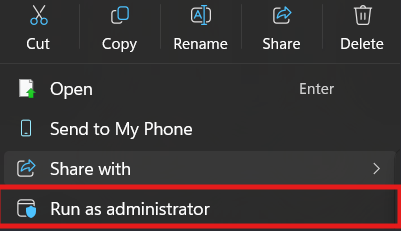
Launch as Administrator
- 1Right-click the loader.
- 2Click Run as administrator.
5
Enter Your Serial Key
Important
Copy your purchased key into the Serial Key field. You can find the key in your order delivery or your email confirmation.
- No extra spaces
- Enter the key exactly as provided
6
Start Injection Process
Notes
- The button may take several seconds to appear.
- Allow the loader to finish loading.
- Do not close the loader.
7
Wait for "Please Open Rainbow Six Siege"
Waiting for the loader
Wait until the loader displays:
Please Open Rainbow Six Siege
8
Launch Rainbow Six Siege
Important
Rainbow Six Siege must be running in Borderless mode. Injection only works in Borderless.
9
Inject the Software
- Once you reach the main menu, press the Insert key.
- The menu opens in the upper-left corner.
- Press Insert again to hide or show the menu.
- The menu position is fixed and cannot be moved.
You're Ready
Enjoy using the software.
External links open in a new tab.